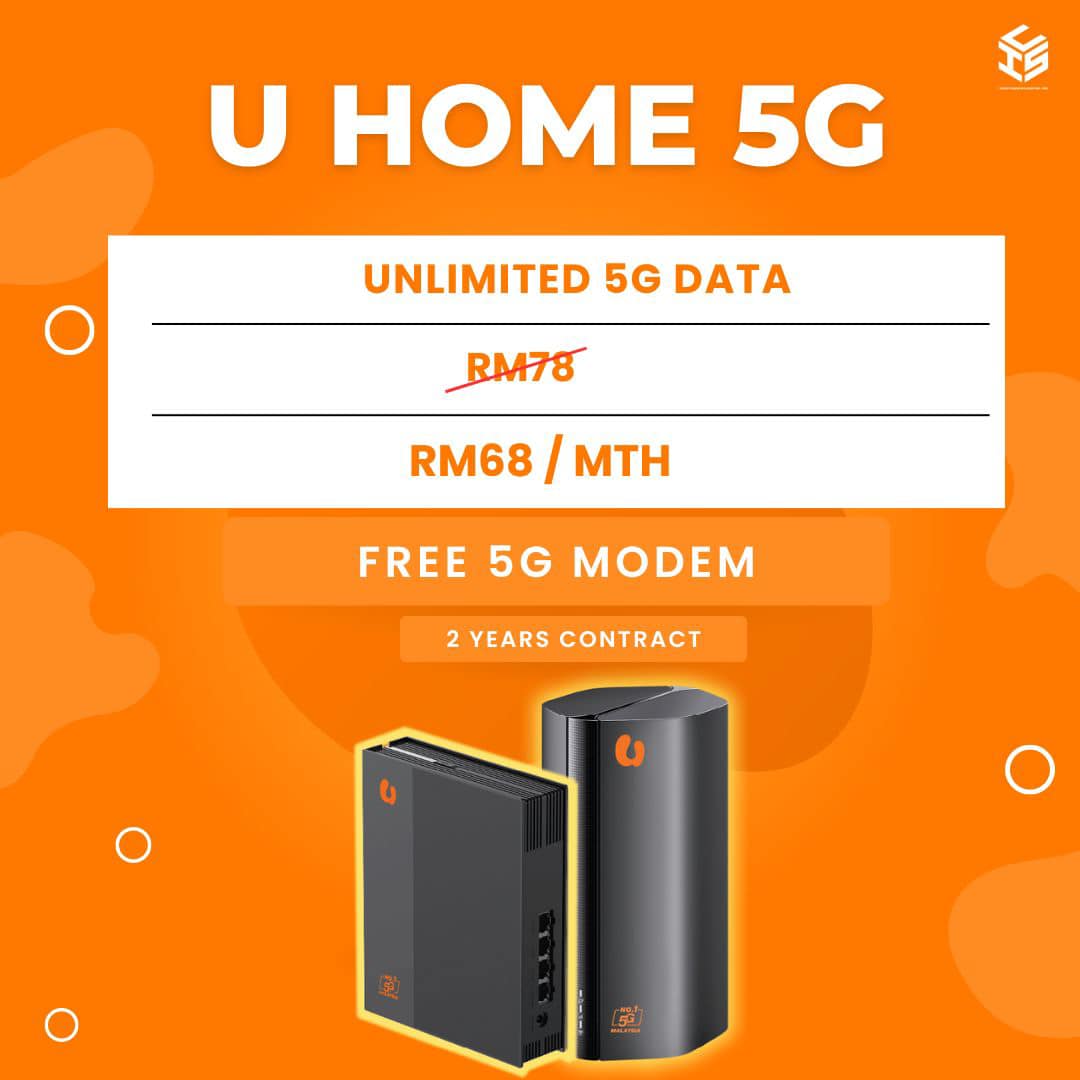
how to apply umobile 5G for home,.

# How to Apply U Mobile 5G for Home: A Complete Guide to Ultra-Fast Home Wireless Broadband
As 5G network infrastructure expands across Malaysia, traditional wired fiber broadband is no longer the only way to secure high-speed internet for your household. Wireless 5G home broadband has emerged as a game-changing alternative, offering fiber-like speeds without the hassle of drilling holes, hiding long cables, or waiting weeks for a technician.
Among the top telecom providers, U Mobile offers some of the most competitive, truly unlimited 5G home broadband plans on the market. If you are looking to cut the cord and switch to a flexible, high-speed wireless setup, this step-by-step guide will walk you through how to apply for U Mobile 5G home broadband. For more digital solutions, tech tips, and registration updates, you can also explore resources online at [Webster eSoftware](https://www.websteresoftware.com/).
### Why Choose U Mobile 5G Home Broadband?
Before applying, it helps to understand why wireless 5G broadband is rapidly growing in popularity:
* **Plug-and-Play Simplicity:** There is no need for internal wall drilling or complex wiring. You simply insert the 5G SIM card into the provided router, plug it into a power outlet, and you are online.
* **Fiber-Like Speeds:** U Mobile’s 5G network delivers massive bandwidth, enabling ultra-smooth 4K streaming, rapid file downloads, and lag-free gaming.
* **Truly Unlimited Data:** U Mobile Home 5G plans offer uncapped data quotas, meaning your family can browse, work, and stream without worrying about sudden throttling or extra charges.
### Step 1: Check 5G Coverage at Your Address
Because 5G relies on cellular tower signals rather than physical underground cables, network availability depends on your location.
* Before applying, visit U Mobile’s official coverage map or consult an authorized digital agent to check 5G availability at your specific residential address.
* Ensure that your home falls safely within the stable 5G coverage zone to guarantee maximum speeds and connection stability.
### Step 2: Choose Your Plan Setup
U Mobile typically offers two distinct ways to subscribe to their Home 5G broadband, depending on your budget and hardware preferences:
1. **SIM-Only Plan:** If you already own a compatible, unlocked 5G home router, you can opt for a standalone SIM plan. This usually comes with a shorter commitment or no lock-in contract.
2. **Router Bundle Plan:** If you don’t own a 5G router, U Mobile offers bundles that include a premium, high-performance 5G WiFi 6 router (often on a 24-month contract). This router is specifically optimized to broadcast strong, dual-band Wi-Fi signals throughout your home.
### Step 3: Prepare Your Supporting Documents
To ensure a quick and seamless registration process, have the following documents ready:
* **Malaysian Citizens:** A clear photo or scan of your MyKad (Identity Card) – front and back.
* **Foreigners:** A valid passport copy. (Note: Foreign registration typically requires a standard security deposit).
* **Payment Method:** A credit/debit card or online banking details for the initial upfront payment or advance payment depending on the chosen plan.
### Step 4: Submit Your Application
You can apply for U Mobile 5G broadband through multiple seamless channels:
* **Online Application:** Visit official partner portals or tech platforms like [Webster eSoftware](https://www.websteresoftware.com/) to find guided registration links. Fill out your details, select your plan, upload your identification documents, and complete the sign-up process.
* **In-Store Visit:** You can also walk into any physical U Mobile service center or authorized dealer. The staff will verify your coverage on the spot, process your application, and hand over your SIM card and router immediately.
### Step 5: Setup and Placement Tips
If you applied online, your U Mobile 5G SIM card (and router bundle, if selected) will be delivered to your doorstep within a few working days. Once it arrives, follow these tips for the best performance:
* **Insert and Power Up:** Slide the U Mobile 5G SIM card into the router’s designated slot, connect the power adapter, and turn it on.
* **Optimal Router Placement:** Do not hide the router inside a closed cabinet or behind a TV. For the strongest 5G cellular reception, place the router near a window or in an open area on a higher floor of your home.
* **Connect Your Devices:** Locate the default Wi-Fi name (SSID) and password on the sticker beneath the router, connect your devices, and start enjoying ultra-fast 5G speeds!
### Conclusion
Switching to U Mobile 5G Home Broadband is one of the fastest, most convenient ways to upgrade your home internet ecosystem. Without the restrictions of physical fiber lines or long installation delays, you can get your whole house connected to high-speed internet in a matter of minutes.
Ready to explore more technology insights and modern digital tools? Head over to [Webster eSoftware](https://www.websteresoftware.com/) to discover creative software solutions and tech resources tailored to your digital lifestyle today!
Need broadband for home or your business in Malaysia?
Click on the link below to check the address and registration online

Registration, broadband installation in Malaysia
Please provide your full address ( no unit / lot , floor , building , park etc ) for review
For further inquiries , please contact us ( online form )
or via email : ✉[email protected]
Why register with us ?
- TRUSTED : We are an authorized and registered agent for broadband Malaysia .
- SAVE : No need to broadband center , crammed in traffic , looking for parking and so on .
- EASY : Questions and registration is done by email / online .
- QUICK : Registration is fast 15-30minit after the personal details and documents obtained .
- Installation can be scheduled as early as 2-3 days .
- ALWAYS HAVE to answer your questions about the package , coverage and related questions .
- Experience more than 1 years in the registry and install broadband in Malaysia .
- TRUE : We gave the correct answer , without exception , without any doubt .
- HELP : If you have problems port full / missing units / etc. we ‘re here to help .
- SAFE : Information and personal data safe without any violation of privacy .
Please check coverage , see the package broadband , register online or contact us for more information .

Application No deposit charges

Installation Save RM200 with free installation ( limited offer )

Free Equipment Modem , WiFi router , STB set and wireless DECT phones are free ( worth RM800 )

Free Call Talk more with free calls all over the country ( Malaysia )
This is our free channels 免费视频, Love, Like, Share, View, fyp
AI Software Channels AI神器推介
AI Hardware Channels AI硬件推荐
Renewable Energy Channels 比利珍藏
Love, Like, Share, View, fyp